Compare multiple Excel files against one reference
To compare multiple Excel files against one reference, load a reference product list and four comparison files in the same workspace. This example checks stock quantities and unit prices by SKU. File A is the reference for B, C, D, and E: the comparisons are A→B, A→C, A→D, and A→E. The target files are not compared with each other, and their stock quantities are not totaled.
Download the sample files
These fictional records are safe to use for practice. Each file contains only the data shown in this tutorial.
What is in the sample files
Reference file
| SKU | Stock quantity | Unit price |
|---|---|---|
| SKU001 | 100 | 12.5 |
| SKU002 | 200 | 8 |
| SKU003 | 80 | 30 |
Comparison file B
| SKU | Stock quantity | Unit price |
|---|---|---|
| SKU003 | 80 | 30 |
| SKU001 | 120 | 13 |
| SKU002 | 200 | 8 |
File C
| SKU | Stock quantity | Unit price |
|---|---|---|
| SKU002 | 180 | 8 |
| SKU001 | 100 | 12.8 |
| SKU003 | 80 | 30 |
File D
| SKU | Stock quantity | Unit price |
|---|---|---|
| SKU001 | 100 | 12.5 |
| SKU002 | 200 | 8 |
| SKU004 | 60 | 9 |
File E
| SKU | Stock quantity | Unit price |
|---|---|---|
| SKU003 | 80 | 30 |
| SKU002 | 200 | 8 |
| SKU001 | 100 | 12.5 |
Follow these steps
Download all five sample files
baseline.xlsx is reference A; target.xlsx is B; target-c.xlsx, target-d.xlsx, and target-e.xlsx are C, D, and E. Each file has one row per SKU. For your own files, use the same stock units, currency, and tax basis for prices.
Add one reference and four comparison files
Open the workspace. Add A as the Reference file and B, C, D, and E under Files to compare. Select Products in every file. RowKite supports one reference plus up to four comparison files; A stays the reference throughout this run.
Match by SKU and compare two columns
Select SKU under Match rows by, then Stock quantity and Unit price under Columns to compare. Identical headers map by name. Keep Raw values for these numeric samples. Stock quantity belongs in the comparison columns so a quantity change does not change the matching key.
Review each file against A
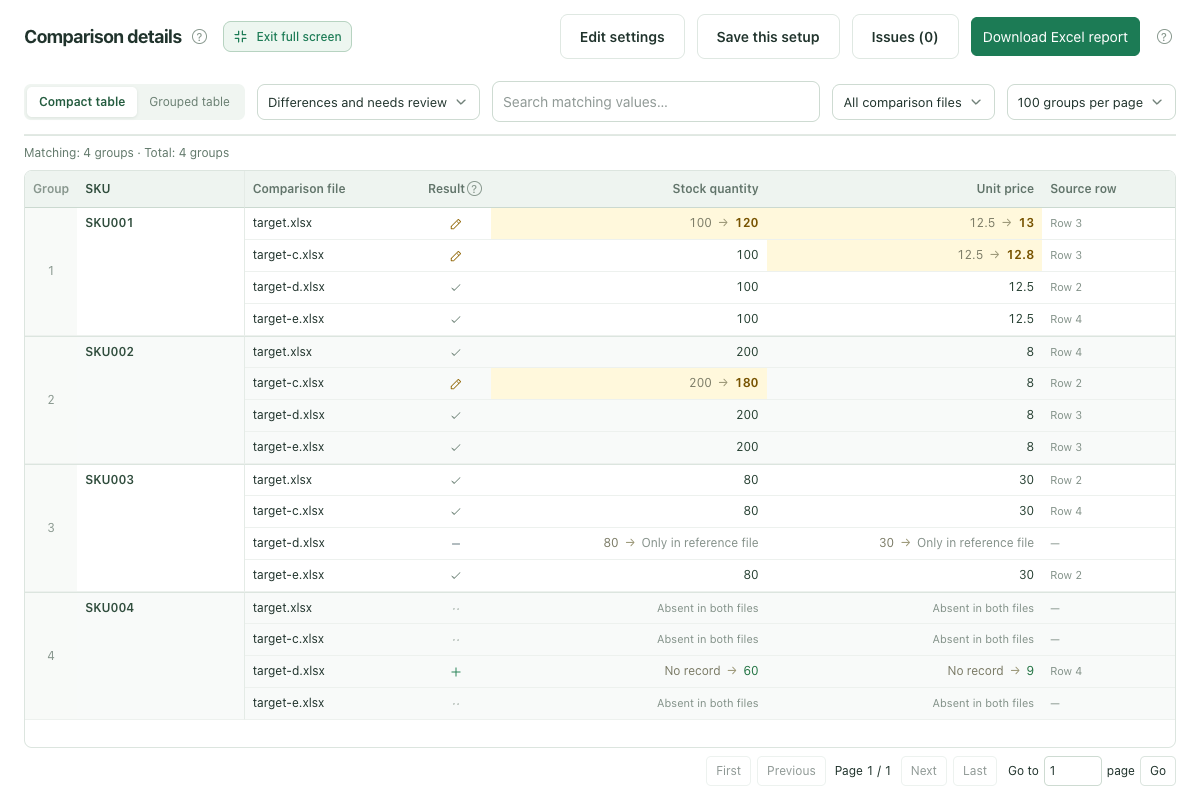
Click Compare files. B changes SKU001 stock and price. C changes the SKU001 price and SKU002 stock. D is missing SKU003 and adds SKU004. All three rows in E match A. Select All records to include unchanged rows, and read every result relative to A.
Download the complete report
Download Excel report and use the comparison file identity and source row references to check each difference. The report includes every target and the full results, regardless of the selected filter or page.
Expected results
Match rows by: SKU. Columns to compare: Stock quantity, Unit price.
| Comparison file | Record | Result | What changed |
|---|---|---|---|
| Comparison file B | SKU001 | B: Changed | Against A: stock quantity 100 to 120; unit price 12.5 to 13. |
| Comparison file B | SKU002 | B: Same | Stock quantity 200 and unit price 8 match A. |
| Comparison file B | SKU003 | B: Same | Stock quantity 80 and unit price 30 match A despite the new row position. |
| File C | SKU001 | C: Changed | Against A: unit price 12.5 to 12.8; stock quantity stays at 100. |
| File C | SKU002 | C: Changed | Against A: stock quantity 200 to 180; unit price stays at 8. |
| File C | SKU003 | C: Same | Stock quantity 80 and unit price 30 match A. |
| File D | SKU001 | D: Same | Stock quantity 100 and unit price 12.5 match A. |
| File D | SKU002 | D: Same | Stock quantity 200 and unit price 8 match A. |
| File D | SKU003 | D: Only in reference | SKU003 exists in A but has no row in D. |
| File D | SKU004 | D: Only in comparison file | D has SKU004 with stock quantity 60 and unit price 9; A has no such row. |
| File E | SKU001 | E: Same | Stock quantity 100 and unit price 12.5 match A. |
| File E | SKU002 | E: Same | Stock quantity 200 and unit price 8 match A. |
| File E | SKU003 | E: Same | Stock quantity 80 and unit price 30 match A. |
Before using your own files
- This run compares each file with A separately. It does not calculate B versus C. To check those files directly, start another run with one of them as the reference.
- SKU004 exists only in D. It is absent from both sides of A→B, A→C, and A→E (bothAbsent), so it is neither an added nor a missing row for those comparisons. The expected results above list records present in each pair.
- Every changed, added, or missing status is relative to A. Counts across targets do not represent unique products, and the comparison does not merge stock or update your source files.
- Align scope, units, and currency before comparing. Resolve blank or duplicate matching keys through the issues list first. Standard .xlsx and .xls formulas are read from saved results.
Limits: 2–5 .xlsx files, 10 MiB per file, 30 MiB total, 10,000 rows and 50 columns per sheet, and 1 million populated cells across all files. Refreshing, closing the page, or leaving the workspace clears the current files.
Read the full guide and comparison rules · Learn how files and results are handled
Keep reading
Download sample files, follow the steps, and apply the same approach to your own records.